
Download Alpemix – Free Remote Access, Desktop Sharing & Secure File Transfer Tool
Alpemix is a free, lightweight remote‑access and desktop‑sharing solution designed for professionals who need to stay connected to their workstations from anywhere. Whether you are providing customer support, training staff, or delivering product demos, Alpemix lets you establish a secure link through firewalls and NAT proxies without complex configuration. The software supports instant messaging, audio communication, and fast compressed file transfers, making it a versatile all‑in‑one tool for businesses of any size. While it does not offer full clipboard control like some premium competitors, its simplicity, speed, and zero‑cost licensing make it an attractive option for teams that value quick deployment and reliable performance.
Key Features that Power Remote Collaboration
- One‑Click Remote Desktop Access – Generate a temporary ID and password to connect to any PC in seconds.
- Live Desktop Sharing – Share your screen with colleagues or clients for presentations, training, or troubleshooting.
- Secure Audio Chat – Built‑in voice channel that can be toggled on during a session for real‑time communication.
- Compressed File Transfer – Drag‑and‑drop files or whole directories; Alpemix automatically compresses data for faster, safer transfers.
- Instant Messaging & Contact List – Send text messages during a session and keep a reusable list of frequent collaborators.
- Firewall & NAT Friendly – Works behind most corporate firewalls and NAT proxies without the need for port forwarding.
- Cross‑Platform Support – Available for Windows, macOS, Linux, Android, and iOS, ensuring you can connect from virtually any device.
- Dynamic Session Credentials – Each launch generates a new ID and password, enhancing security for ad‑hoc connections.
- Lightweight Installation – The installer is under 20 MB and requires no additional runtime libraries.
Installation, Usage & Compatibility Guide
Step‑by‑step installation
- Visit the official Alpemix website and click the “Download for Windows/macOS/Linux/Android/iOS” button that matches your device.
- Run the installer (Windows: .exe, macOS: .dmg, Linux: .deb/.rpm, Android/iOS: app store package). Follow the on‑screen prompts – the process typically finishes in under two minutes.
- After installation, launch Alpemix on both the local and remote machines. No additional drivers or background services are required.
Connecting to a remote PC
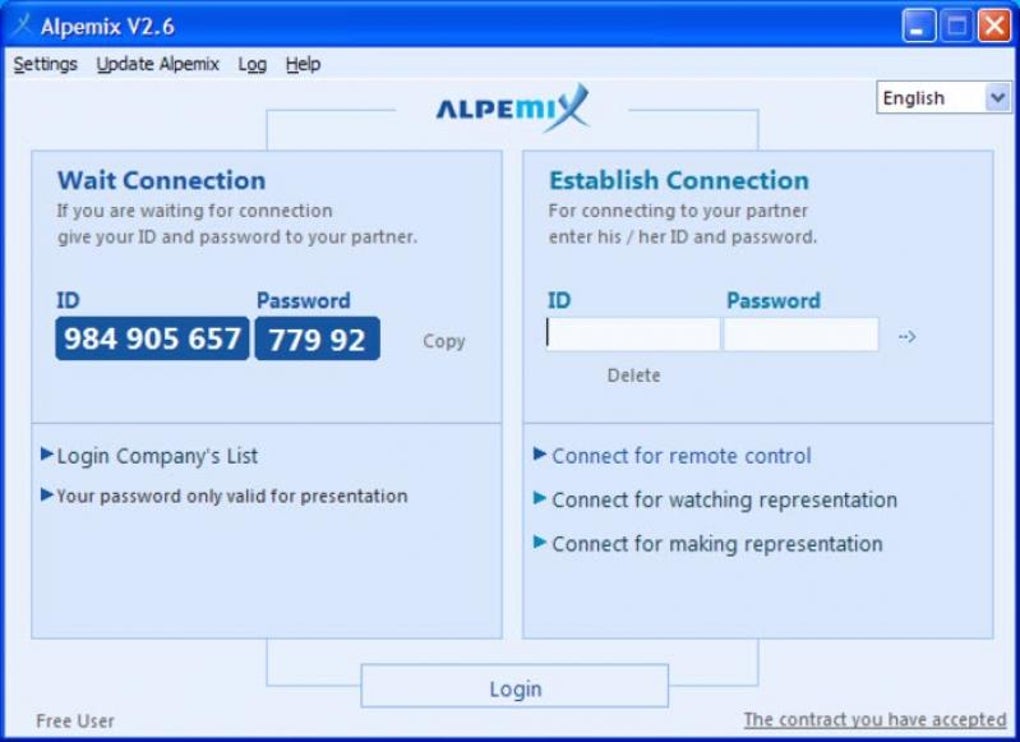
- On the remote computer, open Alpemix. The main window displays a unique 9‑digit ID and a four‑digit password.
- On your local device, enter the same ID and password into the “Connect to Remote” fields and click “Connect”.
- Once the session is established, you can view the remote desktop, initiate audio chat, send files, or start a shared screen session.
Desktop sharing and file exchange
- To share your screen, simply press the “Share Desktop” button and provide the generated credentials to the participant.
- For file transfers, drag files into the transfer pane or use the “Send File” button. Alpemix compresses the data automatically, reducing transfer time by up to 40 % compared with uncompressed methods.
Supported operating systems: Windows 10/11, macOS 10.15 and later, major Linux distributions (Ubuntu, Fedora, Debian), Android 8.0 and later, iOS 13 and later.
Pros, Cons & Frequently Asked Questions
Pros
- Completely free with no hidden fees or trial limitations.
- Zero‑configuration – works behind firewalls without manual port forwarding.
- Fast, compressed file transfer speeds.
- Cross‑platform availability ensures flexibility.
- Dynamic session credentials improve security for ad‑hoc connections.
- Integrated audio and instant messaging enhance real‑time collaboration.
Cons
- Lacks full clipboard synchronization and remote control features found in premium tools.
- No built‑in session recording or logging for compliance purposes.
- Relies on both parties having the latest version installed; older builds may experience compatibility issues.
- Limited customer support options compared with paid competitors.
Frequently Asked Questions
Is Alpemix safe to use behind a corporate firewall?
Yes. Alpemix establishes outbound connections only, so it works through most firewalls and NAT proxies without requiring any port forwarding or special rules.
Can I transfer folders larger than 1 GB?
Absolutely. Alpemix compresses data on the fly, allowing you to move large directories quickly. Transfer speed will depend on your internet bandwidth.
Do I need to create an account to use Alpemix?
No account is required. All you need is the temporary ID and password generated at each launch.
Is there a limit to the number of simultaneous connections?
Alpemix allows one active remote session per device. You can, however, host multiple devices each with its own session.
What languages does Alpemix support?
The interface is currently available in English, Spanish, German, French, and Chinese. Additional languages are planned for future releases.
Conclusion – Why You Should Download Alpemix Today
If you need a fast, secure, and truly free solution for remote desktop access, screen sharing, and file transfer, Alpemix checks all the essential boxes. Its zero‑configuration design eliminates the typical headaches associated with VPNs or port forwarding, while the built‑in audio chat and instant messaging keep communication fluid during live demos or support sessions. Although it doesn’t replace high‑end tools that require clipboard syncing or session logging, Alpemix offers a remarkably lightweight alternative that works on Windows, macOS, Linux, Android, and iOS—all without a single line of code to edit.
For small businesses, freelancers, or IT teams looking to cut costs without sacrificing security, downloading Alpemix is a logical step. Install it on both ends, share the temporary credentials, and you’re ready to collaborate from anywhere in the world. Take advantage of the free, secure remote access that keeps your workflow uninterrupted—download Alpemix now and experience the simplicity of truly plug‑and‑play remote support.







